
Independent Indian Railways information guide
Trains Between Stations
Search trains between stations using your boarding point, destination and journey date. Compare reported timetable options before checking seats.
Find your train
How to Find Trains Between Stations
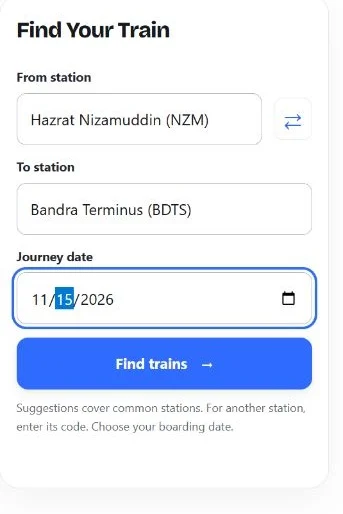
Start with the stations where you want to board and leave the train. You do not need a ticket, passenger details or a booking reference for this route search.
- Choose your From station. Select a common station suggestion, or enter its railway code. For example, New Delhi is NDLS and Hazrat Nizamuddin is NZM. They are different stations in the same city.
- Choose your To station. Use the exact destination you can reach conveniently. The swap button reverses the two station fields when you want to check the return direction.
- Select your journey date. Choose the date you intend to board at the From station. The form sends that date with your enquiry; confirm the service’s operating day before booking.
- Select Find trains. Review the returned route and scheduled times. Filter by train name or number, or sort the list by departure time or shortest reported journey. These controls work on the results already received.
- Pick Use this train. The selected train appears with onward options for seat availability and running status. No ticket is reserved by selecting a result.
For a railway reference, use the official Reserved Train Between Stations enquiry. It asks for a journey date and station pair, with a separate flexible-date option. This website is an independent guide, rather than that official service.
Choose the Exact Stations
A city can have several railway terminals. Searching NDLS to BDTS is a specific station pair; it does not automatically include every station in Delhi or Mumbai. Check where you can board and how you will reach your destination after leaving the train.
Only trains matching both selected station codes appear. The provider can return nearby-city alternatives; those are filtered out so a different terminal is not shown as your requested route.
The suggestions in this form cover common stations. If your station is missing, type its code instead. Avoid choosing a similarly named station just to get a result. Check the station name and code together, then search again if either is wrong.
How to Read Your Train Search Results
Use your trains between stations results to shortlist a service. The fields below help you compare the journey, but they answer different questions from a reservation enquiry.
| Field | What to check |
|---|---|
| Train number and name | Keep the five-digit number, including any leading zero, so you can identify the same service later. |
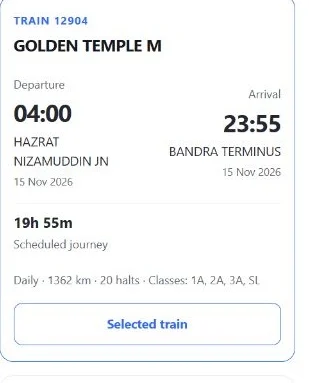
| Departure and arrival | These are scheduled times at the selected stations, rather than a report of today’s delay. |
| Journey duration | Compare the reported time between your stations. A convenient departure can matter as much as the shortest duration. |
| Arrival date | Check whether the journey continues into another day. A date is shown only when the returned times and duration support it. |
| Operating days | Daily or other reported operating information. Confirm the particular travel date before making a booking. |
| Distance, halts and classes | Shown when supplied. Class information describes the train; it does not mean seats are available. |
The result’s received time tells you when this website obtained the response. It is not a promise that the railway changed its timetable at that moment. Recently fetched results may be reused briefly to avoid repeating the same enquiry.
Overnight Journeys: Check the Arrival Date
Consider an illustrative journey that leaves at 23:00 and takes six hours. Its scheduled arrival would be 05:00 the next day, not five hours before departure. Compare the calendar date as well as the clock time when planning a pickup, hotel stay or onward trip.
If an arrival date is missing, check the full schedule before booking. This search does not guess a day from the arrival clock alone. The date you board may also differ from the day the train began its complete route.
No Trains Found? Check These Details
- Check both codes and the direction. A train that serves the reverse direction is a different search. Do not rely on matching city names alone.
- Try another date. Some services operate on selected weekdays. Change the date deliberately and make a fresh enquiry.
- Check a nearby station separately. Include the extra travel time and cost of reaching it. A nearby terminal is useful only if the transfer works for you.
- Read the message. A timeout or unavailable service means the enquiry failed. It does not prove that the route has no trains or that every train is cancelled.
The tool searches for direct train options. It does not build a connection involving a change of train. If you arrange separate journeys yourself, verify both services and allow time to change platforms or stations.
After You Choose a Train
Use the selected train’s seat-availability option to carry its number, station pair and boarding date into the next form. Choose the travel class and quota there, then submit that enquiry separately. A timetable listing alone does not confirm a berth or fare.
Running status needs the date the train started from its first station. The onward link carries the train number but leaves that date for you to choose. Before travelling, check current movement information separately from the scheduled arrival shown here.
To buy a ticket, continue to IRCTC and review the final journey, availability and charges. This website does not issue tickets or collect booking payments. After a ticket is issued, the PNR checker helps you follow that reservation.
Frequently Asked Questions
Can I find trains between stations without a PNR?
Yes. Enter the two stations and a journey date. A PNR identifies an issued reservation and is not needed for this train search.
Can I enter a city name?
Choose a specific station from the common suggestions. A city name can refer to several terminals. For a station outside the suggestions, enter its railway code.
Does a listed train mean a seat is available?
No. The list provides timetable options. Seat availability depends on the train, journey segment, date, class and quota, so check it separately before booking.
Why does a result say selected weekdays?
Some records provide a weekly service pattern without verified weekday labels. Check the operating day on the official enquiry before relying on that train for your chosen date.
Can this search plan a connecting journey?
No. It lists direct options returned for the selected station pair. It does not calculate a change of train or guarantee an onward connection.
Can I book a ticket on this website?
No. Use the IRCTC link above to continue to the official booking service. Selecting a train here does not reserve accommodation or create a ticket.
Compare Trains Between Stations Before Booking
Check trains between stations with the correct terminals and boarding date, then compare the scheduled journey. Verify operating days, check seats for your chosen class and quota, and review the final details before paying for a ticket.
Guide reviewed on 11 November 2026 using Indian Railways enquiry fields, the railway station-code index and the data provider’s documented response. Tool data is supplied through RailKit. This website is not affiliated with Indian Railways or IRCTC.
PNR Status Guide
Independent railway information. Not affiliated with Indian Railways or IRCTC.
PNR checker · About · Contact · Privacy · Terms