
Independent Indian Railways information guide
Train Fare Calculator
Use the train fare calculator to check reported ticket costs for your train, route, journey date, class and quota. Read the fare breakdown before you compare options or book.
Check your train fare
For an official check, use the official Indian Railways fare enquiry. This website is an independent guide, not an Indian Railways or IRCTC service.
How to Use the Train Fare Calculator
Keep your intended journey details ready. This form needs a five-digit train number, not the ten-digit PNR from an existing reservation. You can make a fare enquiry before you have a ticket.
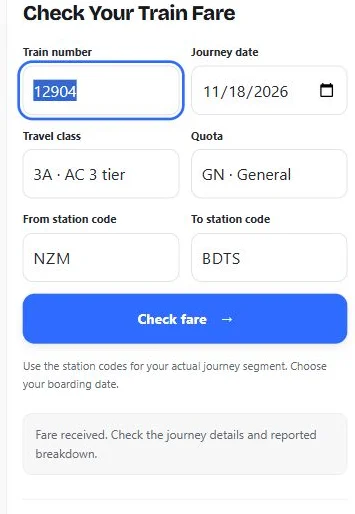
- Enter the train number. Check all five digits, including any leading zero. If you have not chosen a service, start with our trains between stations search.
- Choose your journey date. Use the date you intend to board. A date appearing in this form does not establish that booking is open or that the train operates that day.
- Select the travel class and quota. For example, 3A means AC three tier and GN means General. Use the combination you actually intend to request.
- Enter the station codes. Use your boarding point and destination, in that order. A nearby terminal can have a different code; do not substitute it without checking.
- Select Check fare. Match the displayed journey details, then read the reported total and itemised amounts. Verify the payable amount before booking.
What the Fare Result Shows
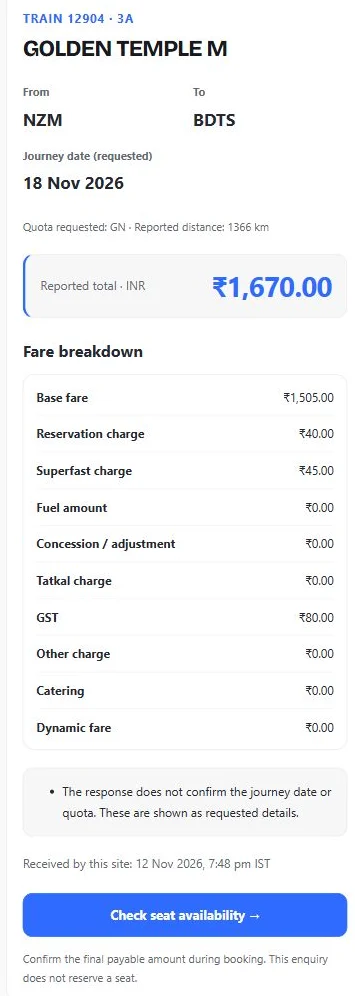
The result identifies the train, station pair and class returned by the provider. The selected date and quota also stay visible. When the response does not include those two fields again, they are labelled as requested details rather than independently confirmed details.
Amounts appear only when the provider returns them in a usable format. A missing amount remains unknown. A displayed zero means the response supplied zero for that field; it does not establish a general railway rule.
| Result field | How to read it |
|---|---|
| Base fare | The basic fare amount supplied for the enquiry. |
| Reservation and superfast charges | Separate components when returned; do not add them again to the displayed total. |
| GST | The reported tax amount. This page does not calculate a replacement tax figure. |
| Tatkal, dynamic fare or catering | Additional returned components. Missing fields are not treated as zero. |
| Concession / adjustment | A provider-reported amount, without assuming your eligibility for a discount. |
| Reported total | The provider’s total, not a total reconstructed by adding the visible rows. |
The received time tells you when this website obtained the response. It is not a guarantee of when the underlying railway fare was last updated. A recently fetched result may be reused briefly, with its original received time retained.
Why Your Booking Amount May Be Different
Compare the same train, direction, stations, date, class and quota before comparing prices. A change to any of those inputs can mean that you are comparing different journeys or booking conditions.
Your final booking also involves passenger details and the options you choose. This form does not collect age, concession eligibility or meal preferences. It does not identify every payment, convenience or optional-service charge that might appear later.
Review the final summary on the official IRCTC booking portal before paying. Check the passenger count, journey segment and selected options there. The amount displayed by this tool is not a payment demand, a reservation or a price guarantee.
Compare Classes and Quotas Carefully
To compare another class, change the class field and submit a new enquiry with the other details unchanged. Note both totals and their enquiry times. The tool does not request a quotation for every class automatically.
Likewise, a General-quota result should not be treated as a Tatkal or Premium Tatkal quotation. Select the quota you need. If that combination is unavailable, check the official enquiry rather than applying a guessed surcharge to another result.
A train fare calculator cannot determine which class is best for your comfort, budget or luggage needs from price alone. Check the service and accommodation details before choosing.
A Fare Result Does Not Confirm a Seat
Price and availability answer different questions. A returned fare does not show that a seat is available, that a waiting-list ticket will confirm or that a booking has been made.
After a successful enquiry, the Check seat availability button carries your train, stations, date, class and quota into the availability form. Review the fields there before submitting. You still need to complete a booking through an authorised reservation service.
If No Fare Appears
- Recheck the inputs. Confirm the train number, direction, exact station codes, date, class and quota. Use different station codes for the two ends of your journey.
- Read the message. A timeout, maintenance notice or provider error is not a zero-price ticket and does not establish that the train is sold out.
- Wait before retrying. Follow any retry time shown. Repeated submissions do not repair an upstream outage.
- Use the official enquiry when needed. This page does not fill a missing quote with a made-up estimate.
Frequently Asked Questions
Does this train fare calculator require a PNR?
No. Enter the five-digit train number and planned journey details. A PNR belongs to a reservation record and is not needed for this fare enquiry.
Can I calculate a fare from distance alone?
This tool uses a specific train, station pair, date, class and quota. It does not offer a distance-only estimate. Enter the actual journey details to request a reported fare.
Does the result cover my whole family?
Do not assume that it does. This form does not collect passenger ages, eligibility or passenger count. Confirm the complete passenger-wise and booking total during the official booking process.
Why are some charges missing or zero?
Missing means the provider did not supply a usable amount for that field. Zero means it supplied zero. Neither should be replaced with a guessed charge, and a zero total must be verified before booking.
Can I book or pay here?
No. This is an independent enquiry tool. It does not sell tickets, collect payment or reserve accommodation.
Does the amount stay valid until I travel?
No price is locked by making an enquiry. Recheck when you book and review the final payment summary. A result’s received time is not a guarantee that the fare will remain unchanged.
Check the Details Before You Book
Use the train fare calculator to understand a reported quotation, compare matching journey details and read the individual amounts. Then check availability and the final payable amount before confirming your booking.
Data supplied by RailKit. Independent information guide; not affiliated with Indian Railways or IRCTC. Instructions and source references reviewed on 12 November 2026.