
Independent Indian Railways information guide
Live Train Running Status
Check live train running status with your five-digit train number and the date it left its first station. See the latest reported movement and station timings, then find your boarding stop in the result.
Check your train
How to Check Live Train Running Status
You need two details: the train number and its start date at the originating station. Keep your ticket handy so you can compare the service and boarding point before making travel plans.
- Enter the five-digit train number. Use the number printed on your ticket. A ten-digit PNR identifies a reservation and belongs in the separate reservation checker. Keep any leading zero in the train number.
- Select the train’s start date. Choose when that particular service left its first station. The date menu uses India time and covers today plus the previous five days. It is a limit of this checker’s data connection.
- Select Check train status. Confirm the train name and journey date in the returned record. Read the reported update time, then use the station filter to find your boarding stop. Include passing stations only when you need the fuller route.

The station filter searches the result already on the page. You can narrow it by name or station code without sending another train enquiry. To check a different service, change the train number or date and submit the form again.
Which Start Date Should You Choose?
A long-distance train can reach your station after midnight or on a later day. Your boarding date can therefore differ from the service’s origin start date. Selecting the wrong day can return a different run of the same train or no matching record.
Example: A service starts at its origin on Monday evening and reaches your boarding station on Tuesday morning. Select Monday for that run.
If you are unsure, check the complete route and the journey details on your ticket. Do not keep changing dates at random. First establish which departure from the originating station belongs to your journey.
How to Read the Running Result
Start with the train number and start date. Next, check how recent the movement report is. Finally, read the arrival or departure entry for your own station. A report from an earlier stop does not establish the train’s exact position at this moment.
| Result field | What to check |
|---|---|
| Movement note | The latest movement description supplied for the selected run. |
| Last railway update | The provider’s reported update time. A blank time does not mean the train is on time. |
| Result fetched | When this website received the record. This can be later than the underlying railway update. |
| Scheduled time | The timetable entry for that station. |
| Reported / expected time | A reported movement time or an estimate for an upcoming stop. Read it with the station’s position in the journey. |
| Delay | The supplied arrival or departure difference. A missing value is shown as a dash. |
| Platform | The platform returned for that station, when available. Confirm it through station displays and announcements. |
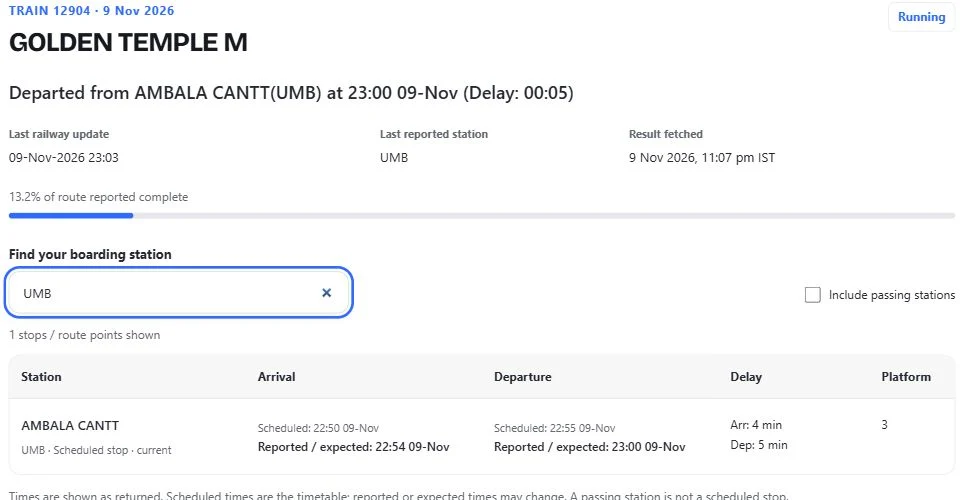
The default view keeps the main stopping points easier to scan. Passing stations can have scheduled times without a reported arrival or departure. A train passing a location does not mean that passengers can board there.
A recently fetched result may be reused briefly. Look at the update labels when checking live train running status, particularly if the train is close to your station. A fresh website response can still contain an older movement report.
Why Is My Train Not Showing?
- Wrong train number: compare all five digits with the ticket. Do not enter the PNR, booking reference or a station code.
- Wrong origin date: check whether the service started the previous evening or on an earlier day of a long journey.
- No returned movement record: the selected run may not have a record available. A missing result alone does not prove that the train is cancelled.
- Temporary service problem: a timeout or request-limit message describes an enquiry problem. Wait before retrying and use the official service if you need another check.
Avoid refreshing repeatedly without first checking the inputs. If the record has no recent update, keep the distinction between a published timetable and a new movement report clear.
Running Status or PNR Status?
Running status follows a train service: where it was last reported and its station timings. PNR status follows your reservation: the passenger’s booking position and assigned accommodation. A confirmed ticket does not tell you whether the train is delayed.
Use this train-number form for movement enquiries. Use the homepage checker when your question concerns a reservation. Keeping those tasks separate helps you read the right result.
Check with the Official NTES Service
For the official railway enquiry, open NTES and choose Spot Your Train. CRIS describes this service as a way to check a running train and expected arrival or departure at the queried station. Follow the options shown on that service.
For platform information at the station, follow the current displays and announcements. This website is an independent information guide and does not operate the trains or the official NTES service.
Frequently Asked Questions
Can I check a train using my PNR?
This form accepts a five-digit train number. Find that number on your ticket, then select the service’s origin start date. Use the separate PNR checker for reservation information.
Should I select my boarding date?
Select the date the train started from its first station. Your boarding date can be later, especially on overnight or multi-day journeys.
Does this show an exact GPS location?
The result shows reported train movement. It is not a continuous GPS feed from your phone or a guarantee of the train’s exact current coordinates.
Why is the platform number blank?
A dash means a platform was not returned in that record. It does not establish that a platform has not been assigned. Check the station displays and announcements.
Can I check a future departure?
This running-status form covers today and the previous five origin dates in India time. For a later departure, consult the published train schedule; a timetable is separate from a movement report.
How often is live train running status updated?
There is no fixed update interval promised by this checker. Read the railway update time in the result. Website fetch time and a new movement report are different timestamps.
Check Live Train Running Status Before You Leave
Keep the correct train number and origin start date ready, find your boarding station, and review the reported update time. Use live train running status alongside current station information when planning your journey.
Guide reviewed on 9 November 2026 using CRIS information about NTES and the data provider’s documented fields. The tool uses RailKit; this website is not affiliated with Indian Railways or IRCTC.
PNR Status Guide
Independent railway information. Not affiliated with Indian Railways or IRCTC.
PNR checker · About · Contact · Privacy · Terms