
Independent Indian Railways information guide
Train Seat Availability
Check seat availability and reported fares for your train, route, date, class and quota.
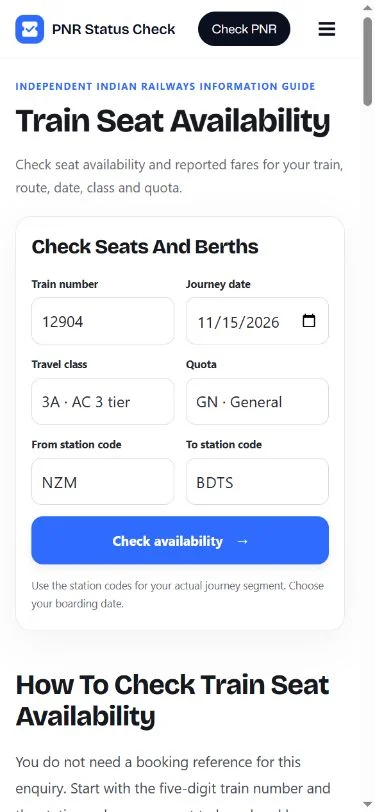
Check seats and berths
How to Check Train Seat Availability
You do not need a booking reference for this enquiry. Start with the five-digit train number and the stations where you want to board and leave. The result applies to those details, so a small input change can produce a different answer.
- Enter the train number and journey date. Keep any leading zero in the train number. Choose the date you plan to board at the selected From station, rather than automatically using the date the train left its first station.
- Choose your class and quota. For example, 3A means AC 3 tier and GN means General. Select the option that matches the ticket you intend to book. A quota appearing in the menu does not establish your eligibility.
- Add the From and To station codes. Use the exact stations for your journey segment. NZM and BDTS are examples of station codes; a city name can cover several different railway stations.
- Select Check availability. Confirm the returned train, station pair, date, class and quota. Review the status for your selected date, then compare any other dates supplied in the same response.
If you have not chosen a train yet, use the search on the official booking portal first. This form checks a specific service; entering a PNR or a train name in the train-number field will not work.
Understand the Result Before Booking
The highlighted row belongs to your selected journey date. Other rows, when returned, let you compare nearby dates for the same train, route, class and quota. They are separate travel dates, not additional places on your chosen day.
| Returned status | What it tells you |
|---|---|
| AVAILABLE with a number | The enquiry reports that many places for the selected details. It does not hold them while you decide or complete payment. |
| RAC with a number | The enquiry offers a Reservation Against Cancellation position. Do not read it as a fully confirmed berth. |
| WL or a waiting-list code | The response reports a waiting-list position. A position or an estimated chance does not guarantee confirmation. |
| REGRET, not bookable or a closed-booking message | Follow the restriction shown in that response and check the official booking options. Do not treat it as an available place. |
| No record, timeout or service error | The enquiry did not return a usable answer. This is different from a verified result showing no available places. |
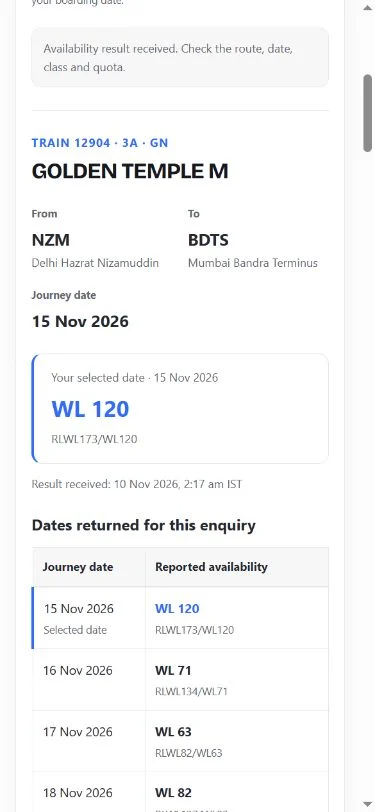
A returned status can change as passengers book or cancel. The receipt time tells you when this website received the response; it is not a promise that the underlying railway data was refreshed at exactly that moment. A recent response may be reused briefly.
For a fuller explanation of reservation codes, read the PNR status meaning guide. After you book, use the PNR checker to follow your own reservation rather than repeating an availability search.
Choose the Right Stations, Class and Quota
A train can have space on one part of its route while another segment shows a waiting list. Checking from the originating station is therefore not a substitute for checking the station pair you will actually use. Verify the station names in the returned record before going ahead.
Classes also have separate accommodation. Sleeper (SL), AC 3 tier (3A), AC 2 tier (2A), AC first class (1A), second sitting (2S) and chair car (CC) are different options. Every train does not provide every class listed in the menu.
The same care applies to quotas. General, Tatkal and other supported options can return different results or may not be available for the selected service. Use the quota you qualify for and confirm its booking conditions on IRCTC. Changing a quota in this form does not create an entitlement to book under it.
Journey Date and the Advance Booking Window
For this form, use the boarding date at your chosen From station. A long-distance service may start at its origin the day before it reaches you. When checking running status instead, that separate tool asks for the train’s origin start date.
Indian Railways describes the general advance reservation period as 60 days, excluding the journey date at the originating station. Some services have a shorter period, and boarding at an intermediate station can affect the calendar calculation. Special booking arrangements can differ, so verify the window for your train and quota.
The calendar on this tool accepts dates from today through the next 366 days to allow enquiries across supported booking arrangements. That input range does not mean that every date is open for General booking. A future date can be valid in the calendar and still be outside your booking window.
Read the Reported Fare Carefully
When a fare is supplied, open the breakdown to see the returned components and total. A missing fare is left unavailable rather than displayed as zero. This website does not collect a booking payment or calculate a final checkout amount.
Confirm the amount on the official booking portal, where passenger details, eligibility and the services you select can affect the final charges. Do not assume that a displayed enquiry fare includes every possible checkout charge.
No Result? Check These Details
- Train and route: compare all five train digits and both station codes. The train must serve the stations in the direction you entered.
- Date: check the boarding date and whether booking is open. A train may not run on every day of the week.
- Class and quota: confirm that the selected combination is offered on that service. An unsupported choice can return no usable record.
- Connection message: a timeout or request-limit notice describes a service problem. Wait before retrying or use the official enquiry.
If a maintenance notice appears while you check seat availability, follow the retry time shown in that notice. The provider may temporarily pause booking-related enquiries. Waiting for that window to end is more useful than repeatedly submitting the same search.
Do not repeatedly refresh without changing an incorrect detail. The form removes the previous result when you change the inputs, helping you avoid reading an old answer as the result of a new search.
Check with Indian Railways and Book on IRCTC
You can verify the same details using the official Indian Railways accommodation enquiry. For booking, continue to IRCTC using the result’s booking button and review the final result there. This website is an independent information guide.
Frequently Asked Questions
Can I check seat availability without a PNR?
Yes. Use the five-digit train number, station codes, date, class and quota. A PNR is created for a reservation and is used to check that booking afterward.
Is seat availability the same as my ticket status?
No. This enquiry shows accommodation offered for a possible booking. Your ticket status belongs to your existing reservation and should be checked using its PNR.
Which date should I enter for an overnight train?
Use the date you board at the selected From station. The train may have left its originating station on an earlier date.
Why do two classes or quotas show different results?
They refer to different accommodation or booking allocations. A result for one class or quota does not establish availability for another.
Does an available result guarantee a confirmed ticket?
The enquiry does not reserve a place. Availability can change before booking completes, so check the status on the ticket that is actually issued.
Can I book directly on this website?
Use the link to IRCTC to book through the official portal. This website provides an enquiry and information guide; it does not issue tickets or take payment.
Check Seat Availability Before Booking
Use the correct train, boarding date, station pair, class and quota when checking seat availability. Compare the returned details, review any reported fare, and confirm the final booking outcome on IRCTC.
Guide reviewed on 10 November 2026 (IST) using Indian Railways reservation information and the official enquiry fields. Tool data is supplied through RailKit. This website is not affiliated with Indian Railways or IRCTC.
PNR Status Guide
Independent railway information. Not affiliated with Indian Railways or IRCTC.
PNR checker · Running status · About · Privacy · Terms